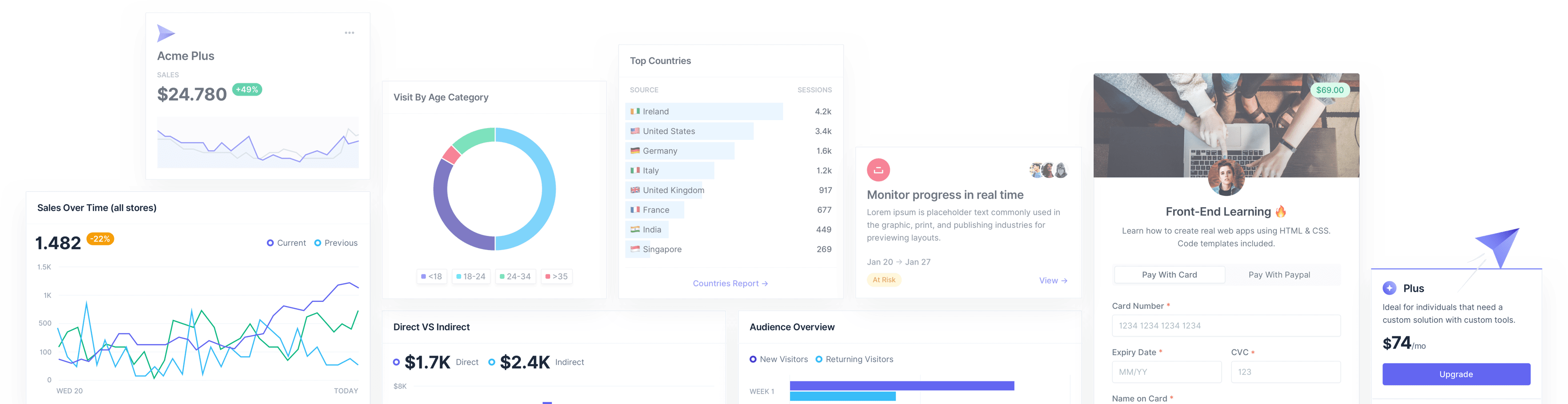
The All-in-one Tailwind CSS Admin Dashboard Template.
The all-in-one admin dashboard template for creating stunning and fully responsive web applications. Mosaic is built on top of Tailwind CSS and coded in HTML, Next.js, Vue, and Laravel.
-
 HTML
HTML -
 React
React -
 Next.js
 -
 Vue
Vue -
 Sketch
 -
 Figma
Figma
Tons of pages, tons of possibilities
Mosaic comes with hundreds of ready-made pages and sections to let you create any type of web application for yourself or your clients.


One product, endless patterns, and user flows
Mosaic is packed with a huge selection of UX patterns and user flows to give you a solid foundation for every kind of project.
- Account Settings
- Billing
- Support
- Product Updates
- Analytics / Data
- Notifications
- Registration / Authentication
- Checkout
- Messaging & Communication
- Team Management
- Calendars & Time
- Tasks & Collaboration
- Onboarding
- Managing orders
- Profiles
- Utilities
- Lists & Tables
- And much more...

Customize anything, with no limitations
Mosaic is built using Tailwind's utility classes, which means that all components have low specificity to allow you to change anything on the fly.
Looks great on all browsers and devices
Worried about cross-testing on multiple browsers and responsive devices? Don't be! With Mosaic, we've already handled that for you, so you can focus on shipping rather than optimising.


Beautiful, clean-looking code to help you move faster
Mosaic has a robust and clean code structure that enables you to quickly personalize the features you want and scale your platform as your needs grow.
- HTML
- React
- Next.js
- Vue
- Laravel


Everything's under control with the design system.
Sometimes, the little details take the most time. That's why we've created a robust library of UI elements that you can quickly integrate into your projects.
- Buttons
- Actions
- UI Badges
- Breadcrumbs
- Dropdown & other states
- Modal & Popovers
- Tooltip & Messages
- Avatar & Placeholders
- Input forms
- Paginations
- Tabs
- And much more...


Bring your data to life with beautiful charts
One of the most crucial parts when creating a dashboard is deciding how to present your data. Mosaic has dozens of ready-to-use widgets built using the chart.js library.

Purchase Mosaic today, plus any updates we release for a simple one-time payment.
- Full access to Mosaic
- Lifetime support & updates

- Access to 18 more templates
- Access to all new Cruip templates
- Lifetime support & updates
Questions & technical specs
Template specs
- HTML Template
The HTML template is shipped with a pre-compiled CSS file. You can use the Tailwind CLI tool if you need to make changes to the template, and need to re-compile the the CSS.
Key dependencies- Tailwind CSS 3
- Alpine.js 3
- Chart.js 4
- Flatpickr 4
- React Template
Basic app built with React + Vite.
Key dependencies- React 18
- React Router 6
- Tailwind CSS 3
- Vite 5
- Chart.js 4
- React Flatpickr 3
- Next.js Template
Basic app built with Next.js with the App Router (app folder), React Server Components, and TypeScript support.
Key dependencies- Next.js 14
- Tailwind CSS 3
- TypeScript 5
- Chart.js 4
- React Flatpickr 3
- Vue Template
Basic app built with Vue + Vite.
Key dependencies- Vue 3
- Vue Router 4
- Tailwind CSS 3
- Vite 5
- Chart.js 4
- Vue Flatpickr 9
- Laravel Template
Basic app built with Laravel Jetstream and Livewire + Blade as Stack.
Key dependencies- Tailwind CSS 3
- Vite 5
- Chart.js 4
- Flatpickr 4
What kinds of web apps can you build with Mosaic?
Given Mosaic's solid structure and the generous amount of components we have included, we feel confident in saying that there is no web app you cannot create using this template as a starting point. For example, you can create admin dashboards for SaaS products, eCommerce, FinTech apps, Project Management, Analytics, etc., but also something completely new by leveraging the numerous pages we have made available in different sections of the template.
Furthermore, don't forget that Mosaic includes a robust design system that allows you to create entirely new layouts and components from scratch.
What sets Mosaic apart from other similar products in the market?
What we believe sets Mosaic apart from its competitors is its history and continuous improvement. When Mosaic first launched, it was one of the very first admin dashboard templates based on Tailwind CSS, which allowed us to enhance the product over time based on feedback from thousands of users who chose it for their projects.
Mosaic currently empowers numerous successful apps, and we believe this is the best indication of its value over other, similar products in the market.
Why choose a ready-made template like Mosaic over a component library?
That's a great question, but there is no universally right answer. Generally speaking, you should choose a product like Mosaic if you are looking for a ready-to-use solution that already includes everything you need to quickly launch your app. On the contrary, a components library might be a better option if you want more flexibility and are willing to invest more time customising all the single components/elements.
Can I try Mosaic before buying it?
Since Mosaic is a digital product, it is not possible to try it prior to the purchase. However, to allow everyone to test the quality of the code before buying, we've created some free lite versions of Mosaic that can be downloaded directly from GitHub:
Does Mosaic include a landing page?
While Mosaic does not include a landing page, we do offer a wide selection of premium Tailwind CSS templates that you can use as the 'homepage' for your admin dashboard. There are plenty of modern landing page and website templates to choose from, that you can easily adapt to match the look of your app. As follows a few examples:
- Open PRO - If you choose a dark layout for your dashboard and need more than one landing page layout to display features, pricing, blog and more, Open Pro may be the perfect option for you. It also supports Indigo's default color scheme so you don't need to change it.
- Simple - This is a great choice if your app has light skin and you want to showcase multiple pages and features on a website. The unique effort it may require is swapping the primary color from blue to indigo.
- Cube - It's ideal if you use a dark layout for your app, and need only a simple landing page to quickly show off your product. If you go with Cube, just be sure to change the primary color from Blue to Indigo or vice-versa.
What new features do you plan to add in future releases?
As we have always done in recent years, we will continue to be guided by our customers in deciding the next features to add to Mosaic, and we will be led by their feedback to continuously improve the product over time.
In the latest release (v5), we introduced the dark version and Next.js support for the template, so in the upcoming releases, there will certainly be room to add new pages and features.